
Teams Direct Routing SBC Monitoring
Comprehensive monitoring solutions for your Microsoft Teams Direct Routing Session Border Controllers
VoIP Toolbox and Direct Routing
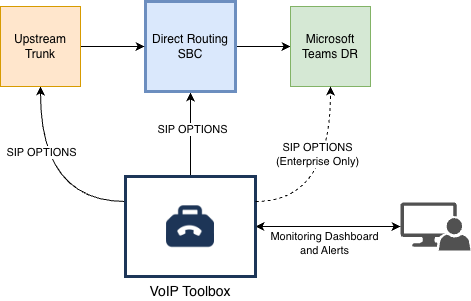
VoIP Toolbox is a comprehensive monitoring solution for your Microsoft Teams Direct Routing infrastructure. It allows you to monitor your Session Border Controllers (SBCs) and upstream trunks, providing visibility into the health and availability of your Teams Direct Routing setup.
- SBC monitoring verifies that your Direct Routing SBCs are responding to SIP requests, which is critical for ensuring your Teams voice infrastructure is operational.
- Upstream trunk monitoring helps you detect issues with your carrier connections before they impact your users.
VoIP Toolbox can also report on the health of Microsoft's Direct Routing endpoints
(sip.pstnhub.microsoft.com).
This is available for Pulse and Enterprise plans.
Reach out to hello@voiptoolbox.net for more information or to request Microsoft
tenant-level monitoring.
Setting Up SIP OPTIONS Monitoring for Direct Routing SBCs
This guide will walk you through setting up SIP OPTIONS monitoring for your Microsoft Teams Direct Routing Session Border Controllers. SIP OPTIONS monitoring provides a lightweight health check that verifies your SBCs are responding to SIP requests without consuming significant resources.
Identify Your Direct Routing SBCs
Microsoft Teams Direct Routing requires certified Session Border Controllers. You should monitor all SBCs in your Direct Routing deployment to ensure comprehensive coverage.
Certified SBCs: Microsoft maintains a list of certified Session Border Controllers for Direct Routing. Ensure you're using a certified SBC for production deployments.
Common Certified SBC Vendors Include:
- AudioCodes - Mediant series (500, 800, 2600, 4000, 1000B, 9000, 3100) and Virtual/Cloud Edition
- Ribbon Communications - SBC 1000, 2000, 5400, 7000, SBC SWe variants, EdgeMarc series
- Oracle - AP 1100, 3900, 4600, 6300, 6350, 3950, 4900, VME
- Avaya - Avaya Session Border Controller for Enterprise (ASBCE)
- TE-SYSTEMS - anynode
- Enghouse Networks - Enghouse BorderNet
- And many others - see the full list for complete details
Important: For each SBC in your deployment, you'll need to know:
- The SBC's SIP hostname or IP address
- The SIP port (typically 5060 for UDP/TCP, 5061 for TLS)
- The transport protocol (UDP, TCP, or TLS)
Configure SIP OPTIONS Monitoring in VoIP Toolbox
For each Direct Routing SBC you want to monitor, create a SIP OPTIONS monitoring endpoint in VoIP Toolbox.
- Navigate to VoIP Toolbox Pulse
- Click Add New SIP Endpoint
- Fill in the form with the following details for each SBC:
Required Fields for SIP OPTIONS Monitoring:
- SIP URI
-
Enter the hostname or IP address of your SBC and optional port. If no port is specified,
5060 will be used. Example:
sbc.example.comorsbc.example.com:5060or192.168.1.100:5061 - Protocol
- Select the transport protocol your SBC is using: UDP, TCP, or TLS. Check your SBC configuration to determine which transport is configured for Direct Routing.
- Scenario Type
- Select OPTIONS from the dropdown. This provides a lightweight health check without establishing a full SIP session.
- Display Name
-
Enter a descriptive name for this SBC (e.g.,
Primary SBC - Data Center 1). This helps you identify the SBC in your monitoring dashboard.
Multiple SBCs: If you have multiple SBCs in your Direct Routing deployment (which is recommended for high availability), create a separate monitoring endpoint for each SBC. This gives you visibility into the health of each individual SBC.
Monitoring Active: Once you save the endpoint, monitoring will begin automatically. The system will send SIP OPTIONS requests to your SBC at the configured interval and alert you if the SBC stops responding.
Get Started
Ready to set up active assurance for your Teams Direct Routing SBCs? Sign up for Pulse to access our infrastructure assurance tools and configure monitoring for your SBCs and upstream trunks.
Monitor Upstream Trunks and Other SBCs
In addition to monitoring your Direct Routing SBCs, you should also monitor your upstream trunks and any other SBCs in your voice infrastructure. This provides comprehensive visibility and early warning of issues.
Upstream Trunk Monitoring
Your Direct Routing SBCs connect to carrier trunks for PSTN connectivity. Monitoring these upstream connections helps you detect carrier issues before they impact your users.
- Create SIP OPTIONS monitoring endpoints for each carrier trunk endpoint
- Use the carrier's SIP hostname or IP address and port
- Configure the appropriate transport protocol (usually TLS for carrier connections)
- Set up email notifications to alert you immediately when carrier connectivity issues occur
Other SBC Monitoring
If you have other SBCs in your infrastructure (e.g., for SIP trunking, inter-site connectivity, or integration with other systems), monitor those as well.
- Monitor all critical SBCs in your voice infrastructure
- Use descriptive names to identify each SBC's purpose
- Configure appropriate check intervals based on the criticality of each SBC
Proactive Monitoring: By monitoring your upstream trunks and other SBCs, you can detect connectivity issues, service degradation, or failures before they impact your Teams users. This early warning system helps you maintain high service availability and quickly identify the root cause of any issues.
Get Started
Ready to set up active assurance for your Teams Direct Routing SBCs? Sign up for Pulse to access our infrastructure assurance tools and configure monitoring for your SBCs and upstream trunks.